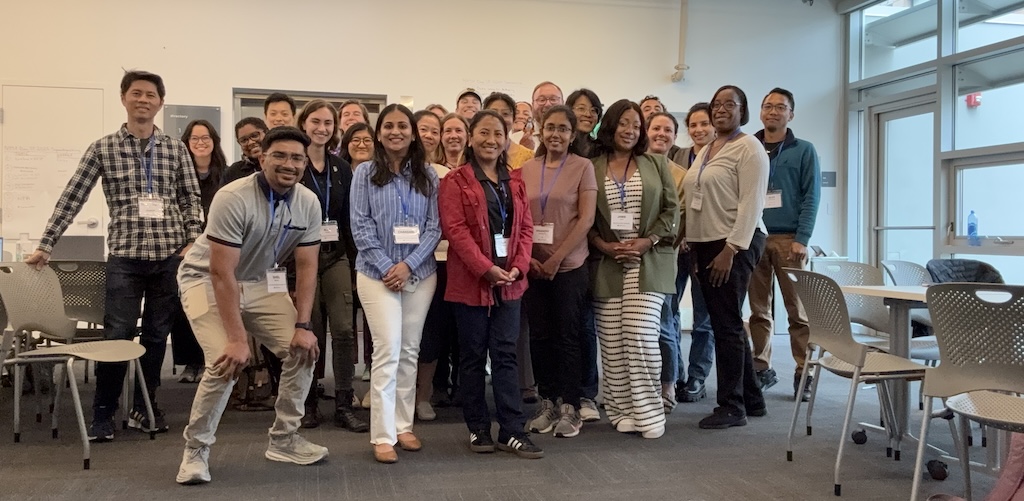
Last week, we took NPSP Day back to San Francisco! This time we had the privilege of hosting the day at SPUR’s centrally located penthouse downtown, with floor-to-ceiling windows, an outdoor balcony, and plenty of natural light to match the energy in the room. Huge thanks to Michelle and the rest of the SPUR team for letting us use their beautiful space!
Attendees traveled from as far away as Sacramento to join local Salesforce admins for a day of learning, problem-solving, and connection. For many in the community, this was one of the first opportunities in years to meet other nonprofit Salesforce users in person. A special thanks to Staci and Katie from Idlewild Partners (our cohost) for helping make this opportunity possible!
As is typical for the NPSP day crowd, attendees were sharp, curious, and full of questions, ready to tackle everything from reports and dashboards to AI-driven donor experiences. One standout moment came from Colby (YMCA of San Francisco), who delivered a 10-minute “speedgeek” session on using AI to enhance website chatbots and connect with donors via Salesforce, showing the promise of AI in action.
Read on for key takeaways from our breakout sessions!
- Reports & Dashboards
- Data Management & Deduplication
- Campaign Best Practices
- Permissions, Profiles & Security
- Process Automation & Flows
- Marketing Management & Email Deliverability
- Third-Party Apps & Integrations
- AI in Action

Reports & Dashboards
The group explored best practices for creating reports and dashboards that staff will actually use, striking a balance between granular detail and practical usability. Attendees discussed strategies to make reporting both accurate and accessible, ensuring insights drive action.
Key takeaways:
- Use custom report types and granular report types for flexibility; filter deleted records out with Deleted = False.
- Focus on building reports staff actually use: Campaign Progress, Open Balances, Donor Stewardship, and Task & Activities Tracking.
- Creating a set of template reports empower staff while allowing customization without starting from scratch.
- Tableau vs. Salesforce reporting: Tableau offers more flexibility but may be less distributable without a viewer license; Salesforce native tools integrate well but require specific object filters.
- Consider apps like Apsona for merging duplicates, batch gift entry, acknowledgment letters, and nested filters.
Data Management & Deduplication
Admins shared strategies to maintain clean, usable data and prevent duplicates before they disrupt workflows. This session highlighted tools, validation rules, and user engagement techniques to keep data reliable and actionable.
Key takeaways:
- Flag duplicates at creation with validation rules or automations; AI can help refine matching rules.
- Use tools like Apsona or Jetstream for bulk deduping and mass data uploads.
- Encourage user buy-in through training, accountability, and tying data tasks to organizational goals.
- Monitor data regularly with reports or dashboards, focusing on KPIs and high-impact fields.
- Manage leads from external forms carefully, and consider placeholder IDs when unique identifiers are missing.

Campaign Best Practices
In this session, participants looked at Campaigns as the backbone of fundraising, email marketing, and event tracking, with emphasis on consistency and clarity.
Key takeaways:
- Use a parent campaign hierarchy and avoid overcomplicating with grandchildren campaigns.
- Naming conventions are crucial. It can be wise to include the fiscal year at the beginning of a name (e.g., 2025 Year-End Appeal).
- Distinguish campaigns from attributes: campaigns track how money is raised, not how it’s allocated.
- It can be useful to organize in Excel first and align with your marketing platform for easy integration.
- Segment campaigns by type: events, ticket sales, silent auctions, and appeals.
Permissions, Profiles & Security
In this session, folks explored best practices for user management, permissions, and safeguarding data.
Key takeaways:
- Use the Integration User License for system accounts to save on license costs.
- Be prepared to transition from Profiles to Permission Sets for flexible, role-based access.
- Document roles and access needs internally for clarity.
- Protect against phishing and unauthorized app installations.
- Backup metadata regularly with tools like Gearset or Github; sandbox refreshes help preserve changes.
Process Automation & Flows
In this session, Flows were highlighted as powerful tools to streamline data entry, trigger communications, and boost morale, but only when implemented thoughtfully. Attendees discussed how to balance automation with user ownership and avoid unnecessary complexity.
Key takeaways:
- Use Flows for confirmations, data validation, calendar invites, and retroactive updates.
- Screen Flows simplify complex processes for users and reduce errors.
- Apply strict naming conventions and build fault paths.
- Evaluate automation requests carefully. Not everything that can be automated should be automated.
- Track requests via Slack, Salesforce Cases, or project management tools for clarity.
Marketing Management & Email Deliverability
Marketing-focused admins dove into email best practices and campaign management in Salesforce NPSP, exploring ways to improve engagement, track performance, and ensure deliverability.
Key takeaways:
- Monitor email deliverability with tools like senderscores.org and emailchecker.net.
- Track opt-ins and opt-outs accurately in Salesforce and Pardot.
- Avoid mass BCC emails; consent is key.
- Connect email campaigns to Salesforce campaigns for reporting and analytics.
- Drip campaigns can automate donor engagement while maintaining personalization.

Third-Party Apps & Integrations
In this breakout, participants reviewed tools that extend Salesforce capabilities, from e-signatures to donation management.
Key takeaways:
- AdobeSign/EchoSign integrate well but might be costly for integrated agreement signing services.
- Soapbox Engage streamlines donations, event reservations, and simple to complex ticketing needs.
- Salesforce Slack integration helps visualize opportunities and donor data in real time.
- Jetstream and Apsona simplify data uploads and deduplication.
- Wishlist items include POS integration, merch stores, and syncing SF tasks with Outlook.

AI in Action
Here, folks explored practical AI applications in Salesforce, moving beyond the hype to focus on tools that genuinely enhance workflows and save staff time. The session emphasized aligning AI use cases with organizational goals and ensuring data privacy while delivering measurable value.
Key takeaways:
- Align AI with clear organizational objectives (streamline ops, increase revenue, save staff time).
- Use AI tools for formula fields, donor engagement, and website chatbots, but validate results with humans.
- Data privacy is a top concern; use secure channels and restrict sensitive data.
- Start small with MVPs and advocate internally before full deployment.
- Consider AI as an enhancement, not a replacement, for staff workflows.
NPSP Day San Francisco was a fantastic day of sharing knowledge, solving challenges, and building community. We’re grateful to everyone who joined us, whether you were just starting your Salesforce journey or sharing hard-earned wisdom with the group.
Shout out to our host!
A huge thank you to Michelle Chang and the SPUR team for providing such a beautiful and welcoming space for NPSP Day San Francisco. We’re also deeply grateful to Idlewild Partners for sponsoring the event and helping make this community gathering possible.

Join a Future NPSP Day!
Want to join in on the fun? Check below or visit npspday.org to see if we’re coming to a city near you and be sure to mark your calendar!
- NPSP Day New York - October 9
- NPSP Day Washington DC - November 6
- NPSP Day Philadelphia - December 4

 Donations
 Events
 Petitions
 Forms
Forms Shop
Shop Directories